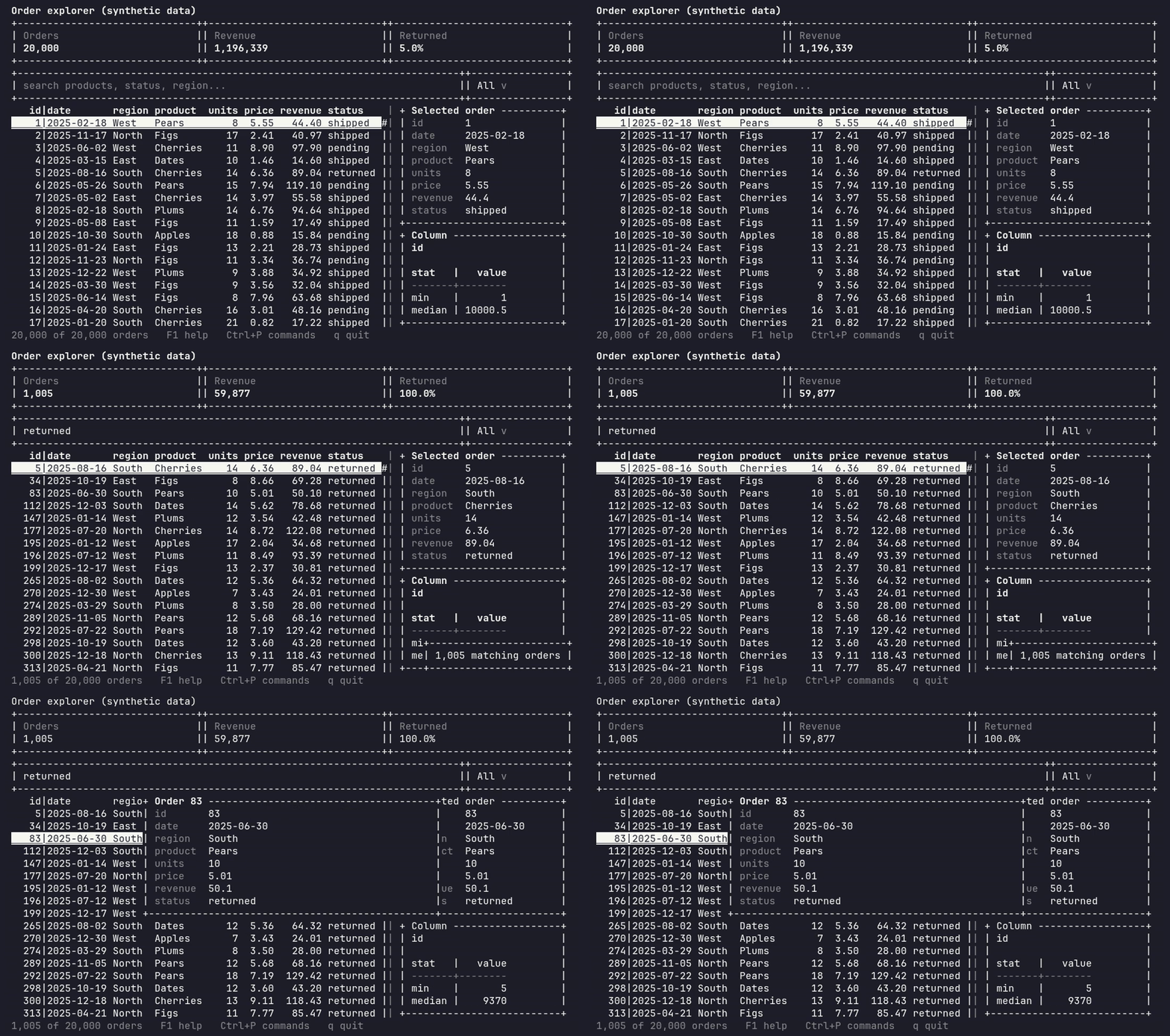
A terminal user interface (TUI) framework for R, with reactive components and first-class support for data workflows.
Build modern terminal applications with R: data explorers, dashboards, database browsers, SQL workspaces and internal analytical tools. termr combines widgets, layouts, events, reactive state and themes in a framework that can be tested without an interactive terminal.
R is already excellent at data, statistics and machine learning. termr adds a terminal application layer around those workflows. A virtual framebuffer and incremental rendering send changed cells to the terminal; application code works with widgets and events instead of ANSI escape sequences.
Read the termr documentation and the terminal UI tutorial.
Run this in R started inside a real terminal:
library(termr)

selected <- signal(0L)
ui <- app(
  vertical(
    horizontal(
      metric("Rows", nrow(mtcars)),
      metric("Selected row", function() selected())
    ),
    data_table(mtcars, id = "cars", zebra = TRUE, header_sort = TRUE),
    button("Quit", on_press = function(event, app) app$exit())
  ),
  on("datatable.row_selected", "#cars", function(event, app) {
    selected(event$data$row)
  }),
  bind("q", "quit")
)
run(ui)
Use the arrow keys to move through rows, Tab to move focus, F1 for help,
and the Quit button or q to exit. signal() is part of the experimental
reactive graph; core app, layout, event and in-memory table APIs are intended
to be stable. To inspect a data frame directly, call browse_data(mtcars).
data_table() formats and paints the visible viewport. In-memory tables
support sorting, filtering, search, selection, and resizable, hidden and
frozen columns. Lazy table sources fetch bounded pages
without loading a whole dataset into an R data frame. SQLite table and query
adapters are included; other DBI drivers can provide paging callbacks.
sql_editor(), db_connection() and db_explorer() compose SQL editing,
database metadata and result browsing through optional DBI packages. Query
execution and page fetches are synchronous; background workers are available
for separate analytical jobs. See data tools,
SQL workflows and database explorer.
run_example()                  # list bundled examples
run_example("data-explorer")
run_example("data-workbench")
Compose forms and dashboards with controls, tabs, split panes, scroll views,
trees, Markdown, metrics and sparklines. Add generated help, modal dialogs,
notifications and a command palette. Stylesheets and themes include
monochrome/NO_COLOR, high contrast and reduced motion.
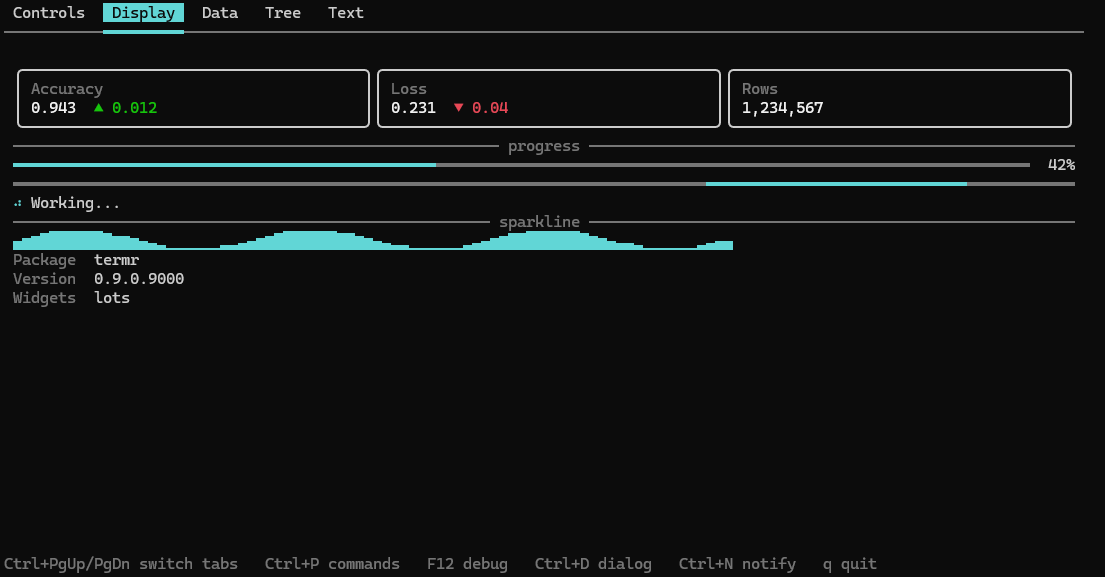
This screenshot comes from the RC1 source tree and displays its package
version, 0.9.0.9000.
Background workers and subprocesses stream output and progress with timeout, cancellation and process cleanup. Static rendering exports text, Markdown, HTML, SVG and JSON for scripts and optional knitr/Quarto output. These are screen snapshots; static rendering does not start an app event loop.
termr requires R >= 4.1.
Install the latest stable release from CRAN:
install.packages("termr")
R-universe provides an R package repository that works with the standard
install.packages() function. Install termr and its dependencies with:
install.packages(
  "termr",
  repos = c(
    "https://menshikovs.r-universe.dev",
    "https://cloud.r-project.org"
  )
)
To install the development version from GitHub, first install
remotes, then run:
install.packages("remotes")
remotes::install_github("menshikovs/termr")
termr uses a small set of R runtime dependencies and keeps DBI, RSQLite, jsonlite and knitr optional. termr itself has no compiled source code.
Interactive apps need a real terminal: use Rscript app.R or R started
inside a terminal. Linux/macOS POSIX terminal mechanics are exercised by PTY
CI; Windows console input is read through an installed PowerShell helper
and its parser is tested in Windows CI.
For RC1, Windows real interactive console smoke and Linux through a real
ssh -t session were manually reported PASS. macOS real terminal, tmux,
screen and RStudio Terminal have not been manually validated. RStudio and
Positron consoles are not terminal hosts; use their terminal tabs for
interactive apps. See the platform matrix and
SSH guide for evidence and limits.
For knitr, CI and other non-TTY contexts, use static export.
pilot <- test_app(app(label("Ready")), width = 40, height = 3)
stopifnot(grepl("Ready", paste(pilot$screen_text(), collapse = "\n")))
pilot$stop()
test_app() uses the real event loop and renderer with simulated input and
time. Testing covers keys, mouse, paste, resize, workers
and snapshots. Full CI run 37758703750
passed on the RC1 commit: Ubuntu release, oldrel-1, R 4.1 and devel; macOS
and Windows release; SQL integration; Linux/macOS PTY; and Windows input.
The six R CMD check jobs reported 0 errors, 0 warnings and 0 notes.
The canonical termr Agent Skill includes
verified API notes, recipes, a runnable template, and headless testing guidance.
Install it for a supported agent with npx skills add menshikovs/termr --skill termr --agent <agent> --copy
(project scope), or copy it to that agent's skill directory. See the
agent compatibility guide for supported paths,
invocation details, and validation status. The installer command could not be
executed in the current network-restricted validation environment.
termr 1.0.0 is the first stable release. Core app/widget construction, layout basics, events, commands, styling/themes, in-memory DataTable and testing basics form the stable API; incompatible changes will be called out in NEWS and migration notes. The reactive graph, workers, editor, lazy sources, database support, static export and custom extensions remain experimental. Workflow widgets added late in the pre-1.0 cycle also remain experimental. The complete classification is in API stability; see migration notes and NEWS for changes.
Start with Getting started, then explore widgets, layouts, events, reactivity, styling, workers and extensions. Agent recipes provide verified end-to-end examples; the termr Codex skill helps agents build and test applications in other repositories. ARCHITECTURE.md describes the implementation for contributors.
Contributions are welcome: see the contributor guide and Code of Conduct. Use Discussions for questions, usage help, and early ideas. Report vulnerabilities privately following the security policy.
MIT